
Plan your perfect line
Draw racing lines, mark braking points, and master every corner. The track editor built for racers who want to improve.
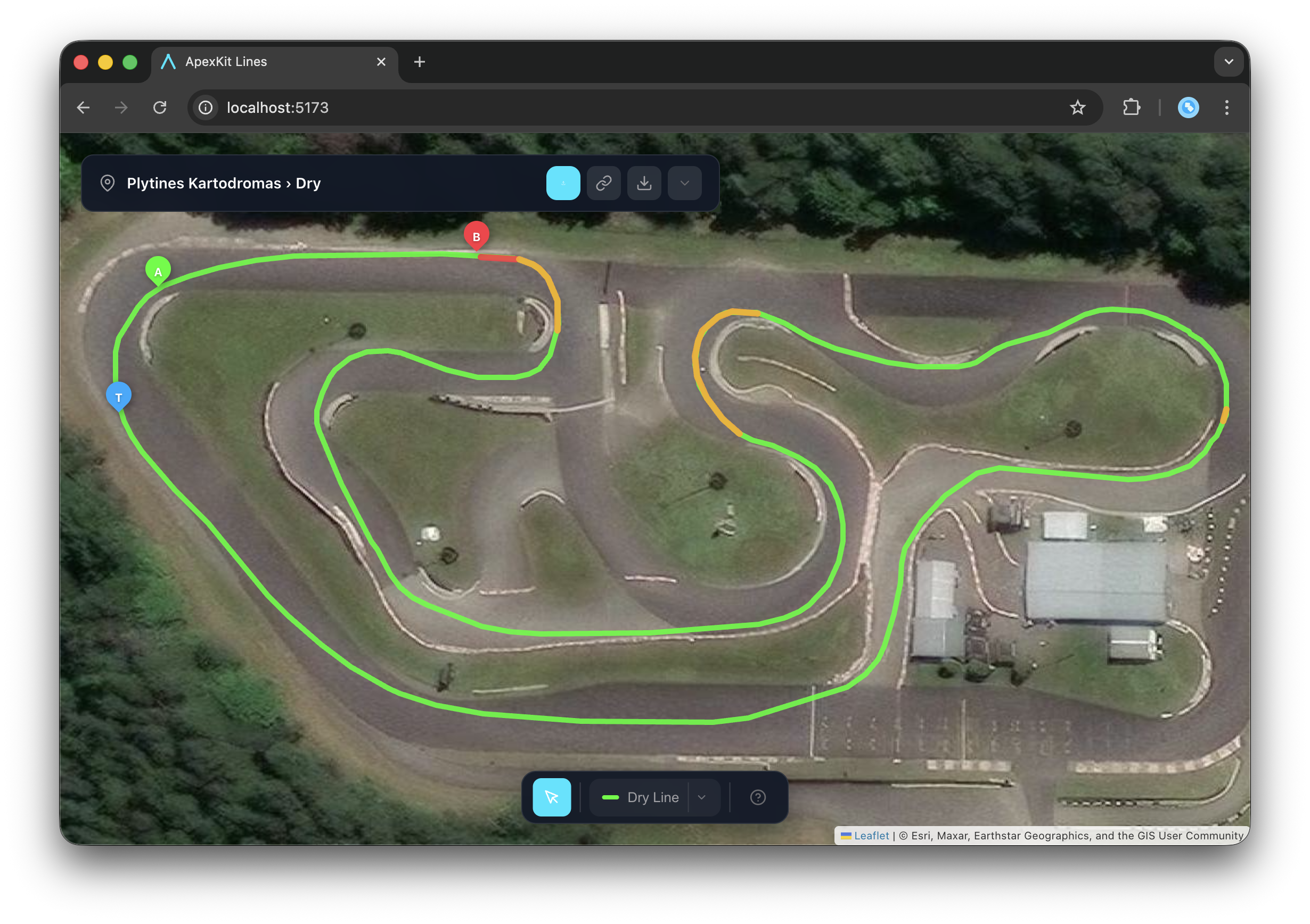
Everything you need to study the track
Built by racers, for racers. No bloat, just the tools that actually help you go faster.
Customize Track Layout
Match your circuit's exact setup — add chicanes, barriers, or alternate layouts for rental vs race configurations.
Draw Racing Lines
Trace your ideal line through every corner. Dry line, wet line, overtaking alternatives — layer them all.
Mark Key Points
Drop markers for braking zones, turn-in points, and apex targets. Build your mental map of the track.
Visual Annotations
Add notes, number corners, highlight trouble spots. Build the reference sheet you'll actually use.
Multiple Setups
Save different line strategies for different conditions. Wet setup, dry setup, qualifying vs race — switch between them instantly.
Export & Share
Download as PNG, GPX, KML, or GeoJSON. Share with teammates, coaches, or post to your racing community.
Start in seconds
No account needed. Just open and draw.
Find your track
Search the track library or navigate to any circuit on the satellite map. Save it to your collection.
Draw your line
Trace the racing line you want to practice. Mark braking points, apexes, and exit curbs.
Study & share
Review before your session, share with your coach, or compare with faster drivers.